
Once you close the tab, you lose it.
LiveVault saves pages, selections, links, images, screenshots, and notes into one private vault — a click to save, instant to find again.
No account, no sign-in, no waiting on a server. It saves straight to this browser.
Local-first. No account. No server.
Page
Board approves Q3 roadmap — docs.company.com
- Collection
- Work
- Tags
- decisions, roadmap
- Captured
- Now
- Storage
- This device only
How it works
Four steps, all inside your browser
What actually happens between clicking the icon and being able to find it again.
Click LiveVault, or right-click
Save the page, a selected passage, a link, or an image — from the toolbar popup or a right-click menu. A screenshot and a quick note work the same way.
Nothing leaves your browser
The capture, its source URL, and a timestamp are written straight to this browser's own storage. There's no request to a server that can fail, and nothing to sign in to first.
Sort it, or don't
Add it to a collection and a few tags if you want it organized later. Both are one click, and neither is required just to save something.
Find it by searching, not scrolling
Open the vault and search across every title, note, tag, and captured selection — instead of remembering which of forty tabs it was in.
See it in action
This is the actual extension, not a mockup
Every screenshot below is the real, built interface — captured from a loaded copy of the same code /install gives you.
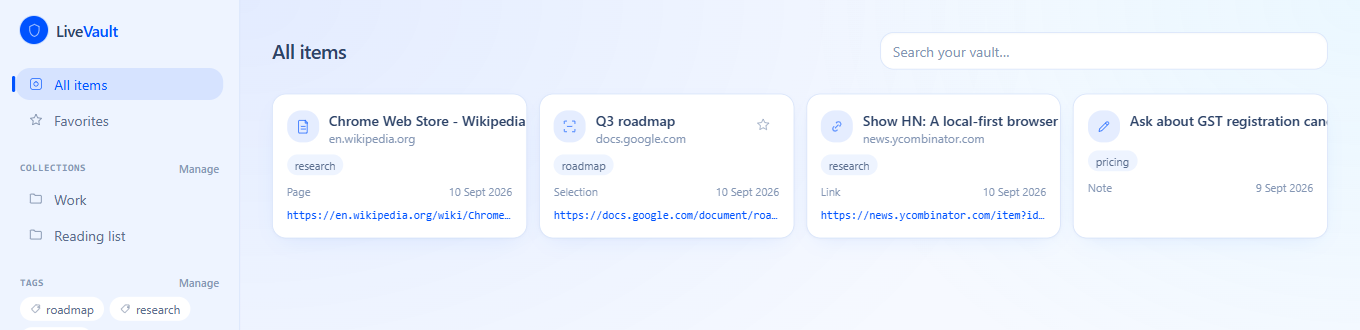
Your vault — searchable, tagged, and organized into collections.
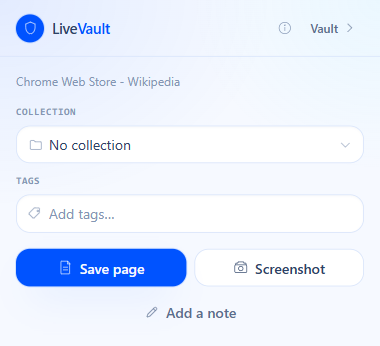
One click from the toolbar — collection and tags included.
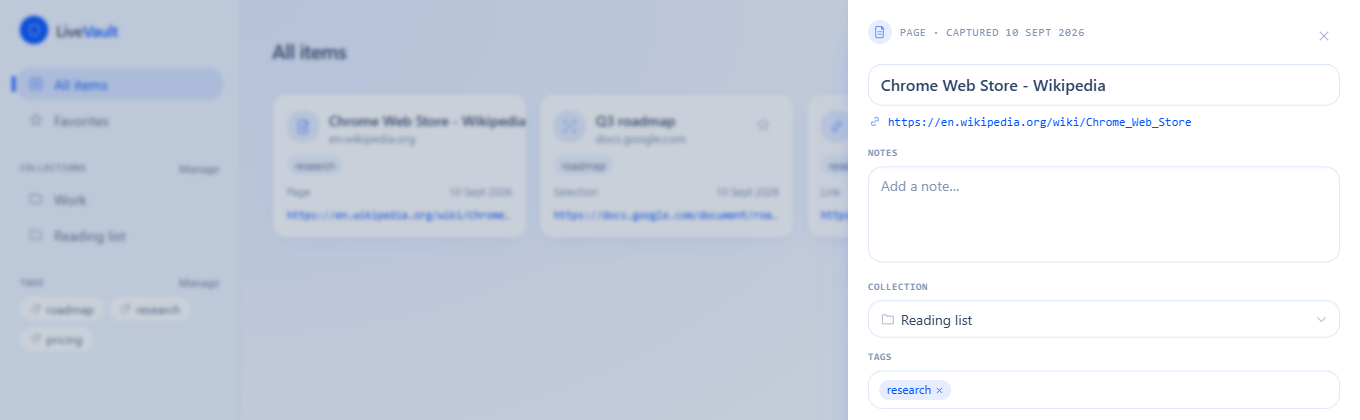
Every capture keeps its source — with room for a note.
Who it's for
Built to remember, not to store forever
This isn't a read-later app or a bookmark sync. It's a searchable vault for anything you'd otherwise lose in a tab you already closed.
Research and reading
Save an article, a paper, or a thread mid-read without losing your place or the tabs around it.
Shopping and comparisons
Capture a product page with a note on the price, and come back to compare without re-searching for it.
Work you'll need to point back to
A decision made in a doc, a notice from a portal, a screenshot of a broken UI — saved with where and when it came from.
Anyone whose bookmarks are a junk drawer
Unsorted stars pile up and stop being searchable. A vault with tags, collections, and real search is a different thing.
Where your data actually goes
Nowhere. That's the point.
Every claim below is something you can check yourself — in this browser's storage, or in the four permissions the extension actually asks for.
Stored only in this browser
Every capture is written to this browser's own storage. There's no account, no server, and no copy anywhere else.
Minimal, gesture-scoped permissions
The extension only ever reads the tab you just acted on — clicked, right-clicked, or used the shortcut on. It cannot read tabs in the background.
No tracking, no analytics
Nothing about what you save, search, or capture is sent anywhere. There's nothing to send it to.
Export anytime
A full backup is one click in Settings — a plain JSON file you control, not a format LiveVault holds onto.
Deleted means deleted
Trash is a real staging area, not decoration: restore it, or delete it permanently, and permanent means the record and any saved image are both gone.
You can read the permissions yourself
Four permissions, each with a one-line reason on the Security page — not a blanket grant to "read and change all your data on all websites."
What this does not do
Local-first cuts both ways: there's no sync between devices, and nothing here survives uninstalling the extension or clearing this browser's data. Export a backup from Settings if that matters to you — the Security page explains why.
Straight answers
The obvious questions
- What actually happens when I click Save?
- The current page's title, URL, and a timestamp are written to this browser's own storage — nothing is sent anywhere. A confirmation appears in the popup within a second, with a link straight to that item in your vault.
- Is it really free?
- Today, yes — every tier is ₹0 under an introductory offer running to 2027, there's nothing to upgrade, and there's no billing anywhere in the product. The free tier is meant to stay free: saving to your own browser costs nothing to run, so there's no ongoing cost to recoup. Paid Pro and Team tiers are planned for the features that do need a server — sync across devices and shared vaults — and both are published on the pricing page rather than kept quiet.
- Where do I actually get it?
- The Chrome Web Store — click "Add to Chrome" above. Prefer to inspect the source or build it yourself first? /install still has the same build as a direct download.
- What happens if I uninstall it?
- Your vault is deleted with it — that's the direct consequence of nothing living anywhere but this browser. Settings has an Export button that writes everything to a single JSON file first, if you want a way back.
- Does it work on every website?
- On any normal https:// page, yes. Browser-internal pages (chrome://, the Web Store) refuse extensions entirely by design — LiveVault still lets you add a note in those cases, just not capture the page itself.
- What happened to the old LiveVault?
- It's still here and still works — expiring, tokenized links for sensitive media, at /demo. This extension is a second, separate product; it just isn't what this site leads with anymore.
Early access
No customer logos here yet
LiveVault just went live on the Chrome Web Store, so there are no reviews, testimonials, or install counts on this page yet. What there is instead is the actual extension to install and try, and a changelog showing what shipped and when.
Found a bug, or want a feature?
Email me directly. There's no feedback form because there's no ticketing software behind it — it's just an inbox I read.
Who builds it
Saifullah Faizan
Founder
I build and ship products end to end — LiveVault included, both this extension and the secure expiring-link tool it shares a name and a codebase with. There's no agency behind this and no team to hand the hard parts to, which is exactly why the permissions this extension asks for are written down plainly rather than gestured at.
Founder and core developer
Every layer of LiveVault is written by one person: this browser extension and its local storage layer, plus — for the earlier secure-link product still running in the same codebase — the Express API, the MongoDB schema, the media storage, the session-based viewer, and this site.
Multiple products shipped to production
Not prototypes. Several separate products run on their own domains and infrastructure, each built and deployed end to end.
IIT Roorkee certified in data science
Alongside a final-year BCA at NSHM Knowledge Campus.
Ships the whole stack
Frontend, API, database, object storage, DNS, CI and hosting — including the deployment pipeline this site runs on.